提示词
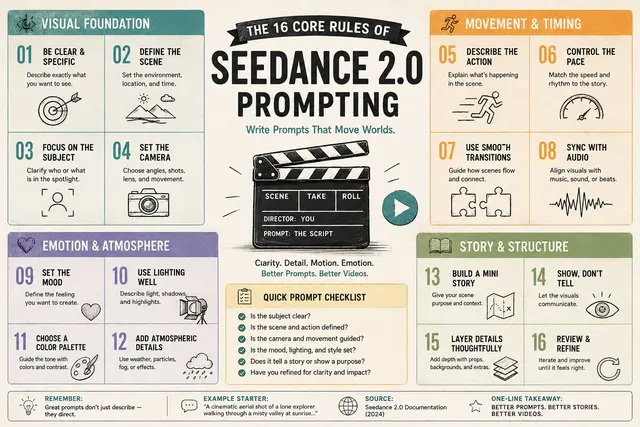
These kinds of cheat sheets and visuals are now so easy to make with GPT

Do this for Seedance 2.0 prompting:
research $ topic
input ::= [tool_or_topic] + [rule_count] + [audience] + [design_tone]   select educational_infographic from principle_poster_archive where subject = [tool_or_topic] and rule_count = [rule_count] and audience = [audience] and content_logic = {   rule_generation: ai_infer([tool_or_topic] + [audience], "most useful principles, habits, tactics, workflows, or laws"),   per_rule: {     number: "clear sequential index",     title: "short action phrase",     microcopy: "one or two concise practical lines",     icon: ai_infer(rule_title, "simple symbolic line icon")   },   hierarchy: "central title block + surrounding rule tiles",   grouping: ai_infer([tool_or_topic], "cluster rules into workflow categories if useful") } and visual_language = {   layout: "clean modular grid",   palette: "soft pastel blocks with limited accent colors",   typography: "bold readable title, compact rule text, clear numbering",   illustration: "simple hand-drawn icons",   texture: "subtle paper grain, friendly editorial poster feel" } and exclusions = [   "no long paragraphs",   "no dense corporate slide look",   "no random icons",   "no unreadable tiny text",   "no fake official branding unless supplied",   "no cluttered infographic chaos" ];
译文
这些种类的速查表和视觉图表现在用GPT制作起来非常容易

为Seedance 2.0提示词做如下操作:
研究 $ 主题
输入 ::= [工具或主题] + [规则数量] + [受众] + [设计风格]
从原则海报档案中选择 educational_infographic,其中 subject = [工具或主题],rule_count = [规则数量],audience = [受众],content_logic = {
   规则生成:ai_infer([工具或主题] + [受众],"最有用的原则、习惯、策略、工作流程或法则"),
   每条规则:{
     number: "清晰的顺序索引",
     title: "简短的动作短语",
     microcopy: "一到两句简洁实用的线条",
     icon: ai_infer(rule_title,"简单的象征性线条图标")
   },
   层级: "中心标题块 + 周围的规则瓷砖",
   分组: ai_infer([工具或主题],"如果有用,将规则聚类到工作流程类别") }
和 visual_language = {
   layout: "干净的模块化网格",
   palette: "柔和的粉彩块和有限的强调色",
   typography: "醒目的可读标题,紧凑的规则文本,清晰的编号",
   illustration: "简单的手绘图标",
   texture: "微妙的纸张纹理,友好的编辑海报感觉" }
和 exclusions = [
   "没有长段落",
   "没有密集的商务幻灯片外观",
   "没有随机的图标",
   "没有难以阅读的小字",
   "除非提供,否则不要有虚假的官方品牌",
"不要有杂乱的图表混乱" ]; 桃子AI画廊Tao Image Gallery