译文
Create a corporate-level commercial brochure visual scheme with the theme of promotional brochures for the 【Brand Name】's 【Industry / Product / Solution】.

Overall Style: High-end, professional, with strong visual impact; avoid traditional Word layout and common PPT feel. Adopt the style of 【Dark Tech Aesthetics / White Minimalist Business / High-end Industrial Style / Artistic Brand Brochure】.

Brochure Content Includes:
1. Cover and Back Cover
2. Company Introduction and Brand Concept
3. Core Products and Technical Advantages
4. Application Scenarios and Solutions
5. Customer Cases and Cooperation Methods
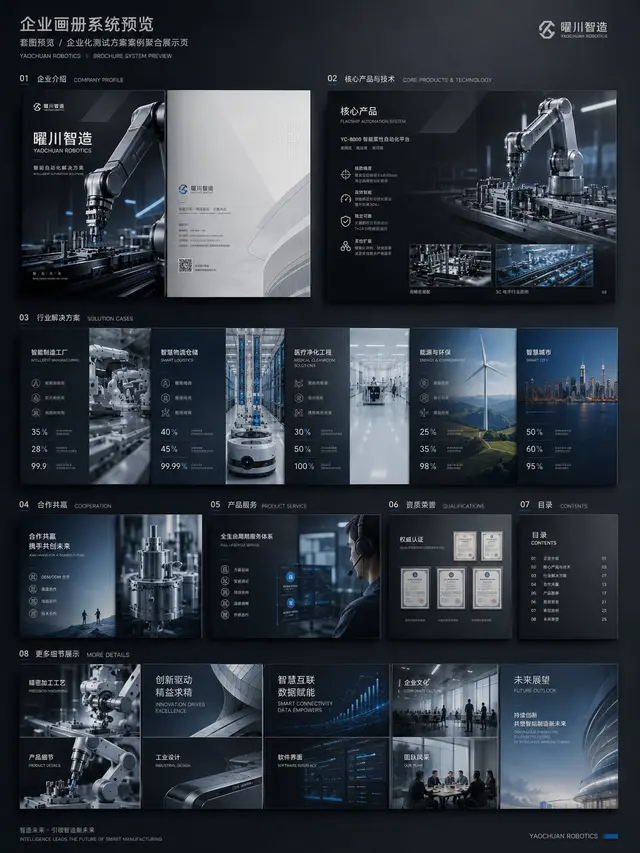
6. Full Brochure System Preview

Requirements:
The layout should have a sense of design, with clear pictures, titles, data, icons, white space, and hierarchical relationships; maintain a unified brand visual system throughout the brochure; highlight the completion level of real commercial materials, avoiding simple text layout.

Structure Planning:
1. Cover / Back Cover: Establish the brand facade, industry temperament, and overall visual tone.
2. Company Introduction Page: Explain the company's positioning, capabilities, and service objects.
3. Product and Technology Page: Show core products, technical advantages, and solutions.
4. Application Scenario Page: Let users see which industries the product can be used in.
5. Case / Cooperation Page: Supplement credibility and commercial conversion information.
6. Full Brochure System Preview: Verify the consistency of style and the systemic sense of the entire brochure.

If there is existing company information, you can upload the old version of the company brochure, company introduction documents, product manuals, website content, PPT proposals, product images, or case images, so that ChatGPT can complete three things:
1. Reorganize the content structure, judge which content is suitable for the cover, company introduction, product page, case page, and cooperation page.
2. Refine the brochure main line, avoiding just stacking information and forming a clear commercial narrative.
3. Unify the visual direction, making the entire brochure look like a single brand system, avoiding a patchwork feel of different pages.

Avoid Pitfalls:
1. Avoid starting with just saying "generate a brochure," otherwise, it may become a template.
2. Avoid just stacking text; the brochure must have product visuals, scene maps, data modules, and design hierarchy.
3. Avoid generating only single pages; it is better to add a full brochure preview image to reflect the complete systemic sense.
 桃子AI画廊Tao Image Gallery